Church welcome-team template
Build a digital church connection card guests will complete
Use a focused set of questions to welcome first-time guests, understand the next step they want, and give your team a readable, permission-aware follow-up record. Parents can then select saved children or add them by name for family attendance.

Family and children's check-in
Follow the connection card with family check-in
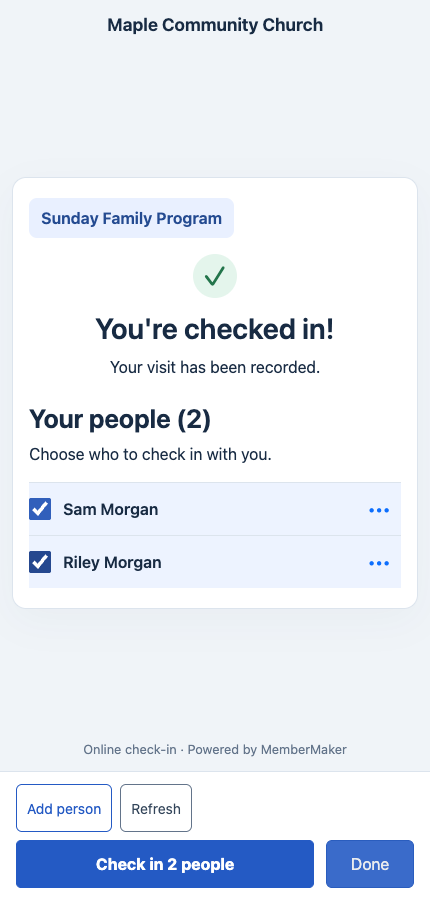
Keep welcome questions focused on the adult completing the card. After their check-in confirmation, they can select saved children or add them by name without completing the connection card again for each child.
An adult can share their ministry interests and contact permission, then record the children attending with them. The children receive separate visits; the adult’s answers and contact permission are not separate answers or permissions from each child.
- Add children by name; no email address or phone number is required for additional people.
- Select saved family members after the parent's normal check-in confirmation.
- Record a separate visit for each selected person at the same event.
Enable Group check-in in your organization's Group/Family Checkin page or Kiosk Settings. It is off by default and works in the app kiosk and web/QR flow.
The parent is recorded as attending too. Group check-in records attendance; use your existing procedures for child registration, classroom assignment, and authorized pickup.
Start with less
The connection card guests are most likely to finish
Ask only for information the welcome team has a clear reason to use. A shorter first interaction leaves room for a more personal conversation later.
Email or phone
Choose one stable identifier for repeat visits, then collect the other contact method only when your follow-up process needs it.
Name
Ask for a name so the welcome team can respond personally. MemberMaker can keep name optional when a lower-friction flow is more appropriate.
Is this your first visit?
Use a Yes or No or single-choice prompt to distinguish first-time guests from people returning to the church.
How may we contact you?
Offer clear choices such as email, phone, either, or no follow-up so the handoff respects the guest's preference.
What would you like to know about?
Use multiple choice for membership, adult groups, volunteering, upcoming events, or speaking with a ministry leader.
Is there anything we can pray about?
Keep prayer requests optional and route sensitive responses only to people approved to receive them.
Copy this structure
A practical digital connection card template
Recreate this sequence as a MemberMaker prompt group and adapt the wording to the way your church actually follows up.
Core fields
- Email or phone as the visitor identifier
- Name for a personal welcome
- First-time or returning visit
- Preferred follow-up method
- Permission for the welcome team to make contact
Optional questions
- Ministries or programs the guest wants to learn about
- How the guest heard about the church
- Accessibility or hospitality needs for a future visit
- An optional prayer request or note
Usually better later
- Full household and family profiles
- Birth dates that are not needed for the welcome
- Detailed addresses before there is a clear purpose
- Long doctrinal surveys or membership applications
Choose the right surface
Paper, QR form, or shared kiosk?
These formats solve different problems. The best choice depends on where guests arrive and how your volunteers support them.
| Format | Useful when | Watch for |
|---|---|---|
| Paper card | A guest prefers handwriting or needs a backup option | Manual entry, handwriting, and secure storage afterward |
| QR or web form | Guests should respond on their own phones from a seat or livestream | Wi-Fi, browser friction, and finding the link |
| MemberMaker kiosk | A visible welcome table can offer one guided, reusable device | The device must be charged, placed well, and supported by a volunteer |
Build it in MemberMaker
Turn the template into a reusable prompt group
Create the experience once, test it with the welcome team, and publish it to one kiosk or every church kiosk.
Configure
- Choose phone or email as the identifier
- Choose whether to collect name and the second contact field
- Add short text, long text, Yes or No, single-choice, or multiple-choice prompts
- Mark only truly necessary answers as required
Test
- Complete a first-time guest check-in
- Repeat the flow with the same identifier
- Confirm sensitive answers appear only where expected
- Test offline submission and later synchronization
Publish
- Give the prompt group a clear ministry-specific name
- Apply it to the welcome-table device
- Train volunteers on the exact handoff
- Review the exported fields before the first live service
Put the checklist into practice
Use a guided check-in station at your next gathering
MemberMaker collects readable contact and attendance records on iPhone, iPad, and supported Android devices, then keeps them ready to review or export.
Set up your questions and kiosk settings in the web dashboard. See live sign-ins here once your kiosk is running.
Create a web accountReady to set up your kiosk? Download the app and sign in to the same account.
