Sunday hospitality workflow
A church welcome table checklist for a calm, consistent Sunday
Prepare the device, table, volunteers, guest invitation, backup plan, and data handoff before the first visitor walks through the door. Include a parent-first family check-in test so children can be added by name and selected on returning visits.
Family and children's check-in
Prepare the welcome table for families with children
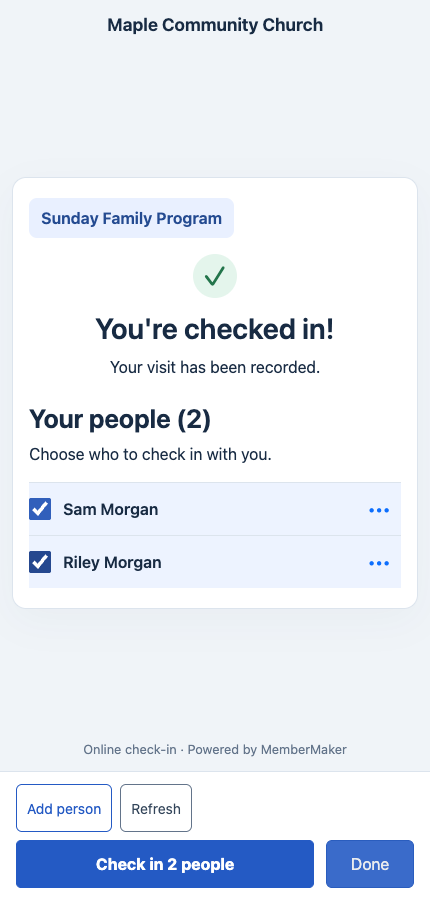
Enable Group check-in before families arrive and rehearse a parent-first visit. Test adding a child by name, selecting saved children, and checking the individual results before finishing.
Add a short instruction beside the kiosk or QR code: “Check yourself in first, then choose the family members with you.” A volunteer can explain the steps while the parent completes their own family check-in.
- Add children by name; no email address or phone number is required for additional people.
- Select saved family members after the parent's normal check-in confirmation.
- Record a separate visit for each selected person at the same event.
Enable Group check-in in your organization's Group/Family Checkin page or Kiosk Settings. It is off by default and works in the app kiosk and web/QR flow.
The parent is recorded as attending too. Group check-in records attendance; use your existing procedures for child registration, classroom assignment, and authorized pickup.
Before the doors open
Prepare the station before guests arrive
A welcome table works best when the technology, physical setup, and volunteer handoff have already been tested.
Device and connection
- Charge the phone or tablet and connect continuous power
- Open the correct published prompt group
- Complete one test check-in and optional checkout
- Confirm pending offline submissions can synchronize
- Enable fullscreen kiosk mode
Table and signage
- Place the screen where arriving guests can see it without blocking the doorway
- Use a stable stand at a comfortable viewing height
- Add one plain instruction such as New here? Please sign in
- Keep glare, cables, drinks, and clutter away from the device
- Prepare a small paper fallback for exceptions
People and ownership
- Assign one volunteer to greet and one person to own the guest list
- Review what the form asks and why
- Agree on how to explain optional questions
- Know who receives prayer requests or sensitive notes
- Confirm the post-service follow-up owner
During the welcome
Keep the interaction human
The kiosk should support hospitality, not replace it. Let guests choose how much help they want and avoid making sign-in feel like an entrance requirement.
Offer, do not block
Invite first-time guests to sign in at a natural point before or after the service without positioning the table as access control.
Give people space
Stand close enough to help but far enough away that contact details and prayer requests are not read over a guest's shoulder.
Help without rushing
A volunteer may type for someone who prefers to answer aloud, or offer the paper backup when the device is not comfortable.
Welcome—we're glad you're here. If you'd like, this short sign-in helps our welcome team remember your visit and follow up in the way you choose. I can help, or you can take your time.
Close the loop
Complete the after-service handoff
Decide who handles the record before Sunday so useful information does not sit untouched.
Review
- Confirm new submissions synchronized
- Separate first-time and returning visits
- Check the requested contact method and permission
- Route prayer requests only to the approved pastoral or care owner
Handoff
- Export the approved fields when another church system needs them
- Assign each requested next step to a named person
- Record corrections without overwriting the guest's meaning
- Store or destroy paper backup cards according to church policy
Improve
- Note where guests hesitated or asked for help
- Remove questions the team does not use
- Adjust placement or signage before the next service
- Retest the published experience after changes
Accessibility and privacy
Make the welcome table usable without over-collecting
A calm setup respects both the person and the information they choose to share.
Accessible placement
Leave clear floor space, use a stable screen height, avoid tiny signs, and keep a volunteer ready to read or type when requested.
Visible purpose
Tell guests why the church asks for information, who will use it, and that optional questions may be skipped.
Limited access
Give guest records only to people responsible for welcome, care, or administration and follow the church's retention policy.
Put the checklist into practice
Use a guided check-in station at your next gathering
MemberMaker collects readable contact and attendance records on iPhone, iPad, and supported Android devices, then keeps them ready to review or export.
Set up your questions and kiosk settings in the web dashboard. See live sign-ins here once your kiosk is running.
Create a web accountReady to set up your kiosk? Download the app and sign in to the same account.
