One account. A clearer view across locations.
Track Attendance Across Multiple Locations in One Dashboard
Stop switching between location dashboards just to answer who checked in. MemberMaker brings authorized organizations into one master view, with a separate attendance record and settings for each location.
Set up your organization in the web dashboard. The optional demo covers check-in and branching questions, not reporting, bookings, or billing.
A problem your team will recognize
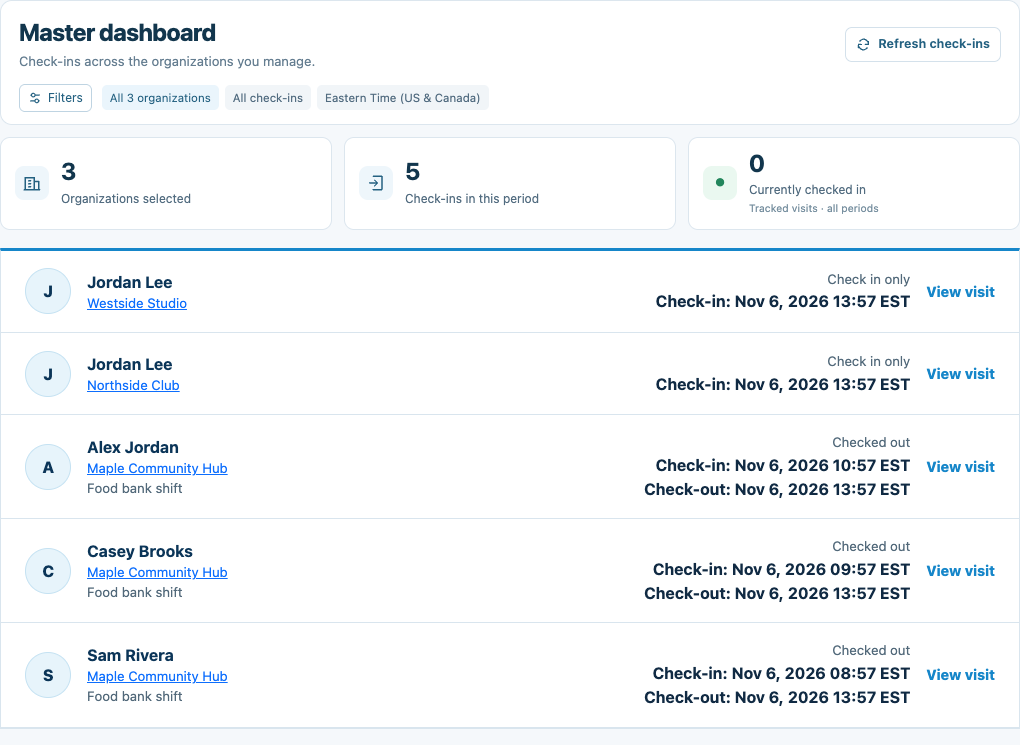
Three community locations. One morning attendance review.
A program director oversees a downtown center, a northside club, and a westside studio. Instead of asking each team for a separate update, the director opens All organizations, filters the combined check-ins, and compares activity. A useful intake prompt group can then be copied to another location as an independent draft.
Open All organizations
Use the workspace selector to open the master dashboard for organizations you can manage.
Compare and investigate
Filter organizations, period, and time zone; open Organization activity for a location-by-location comparison.
Reuse a working setup
Find a group in Prompt library and copy it to selected organizations, then review and publish each independent copy.
Put it into practice
Set up this workflow in MemberMaker
- Connect your account to each organization with management access; kiosk-only access is not enough.
- Choose All organizations in the workspace selector and open Combined check-ins.
- Use Filters to narrow the records and Refresh check-ins when you want the latest view.
- Open Organization activity or Prompt library for comparisons and reusable questionnaires.
Questions before you get started
Can one account manage multiple locations?
Yes. When your account can manage multiple organizations, All organizations opens the master workspace. Each organization retains its own members, settings, administrators, and attendance.
Does the combined dashboard update automatically?
Use Refresh check-ins to load the latest records. The master view does not refresh on a timer. Individual organizations have their own live sign-in views.
Can I filter by location and date?
Yes. Choose organizations, a check-in period, and a display time zone in Filters. Organization activity also compares check-in counts for today, the last 7 days, or the last 30 days.
Can I copy our check-in questions to another location?
Yes. Prompt library lists prompt groups across organizations you can manage. Copy a published version or draft to selected destinations, then review independent draft copies or explicitly publish and apply them to kiosks. Web check-in links need their published group selected separately.
Are visitors and volunteer hours merged across locations?
No. The master view combines authorized check-in records for viewing. Member records and volunteer-hours reports stay in their own organization; member counts are not deduplicated across organizations.
Do we need a billing group to use the master dashboard?
No. Management access controls the master dashboard. An assigned billing owner may separately manage a shared subscription, but payment responsibility grants no organization-record access.
Start with your own organization
Create your account. Build a better check-in routine.
Set up your organization in the web dashboard. The optional demo covers check-in and branching questions, not reporting, bookings, or billing.