A plan for missed sign-outs
Automatic Event Checkout for Missed Sign-Outs
An open visit should not leave your team guessing forever. Set an event-end or duration-based checkout policy for new tracked visits, then review recorded times and correct exceptions when needed.
Set up your organization in the web dashboard. The optional demo covers check-in and branching questions, not reporting, bookings, or billing.
A problem your team will recognize
The workshop finished. Someone forgot to sign out.
A community workshop ends at noon, but several participants leave without tapping checkout. With an event-end policy configured before their visits, MemberMaker closes those tracked visits at the saved deadline. Staff can see that checkout was automatic, correct exceptions, and review any volunteer activity hours before approving them.
Choose a policy
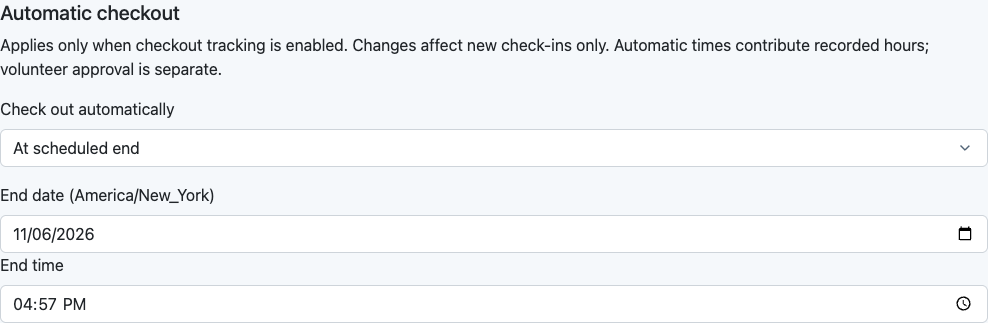
For an event or recurring class, use the scheduled event end or a configured duration. Leave automatic checkout off when that is the better fit.
Save a deadline for new visits
Tracked visits capture the policy in effect when they are created. Later policy edits do not rewrite existing visits.
Review exceptions
Distinguish automatic checkout from manual or corrected departures. Correct relevant times before approving volunteer hours.
Put it into practice
Set up this workflow in MemberMaker
- Enable checkout tracking for your organization and the relevant check-in flow.
- Open an event’s settings or class schedule settings and choose its automatic checkout policy.
- Configure the event finish or elapsed duration before participants check in.
- Review visit details and correct exceptions; use Volunteer hours for eligible volunteer activity reports.
Questions before you get started
What happens if someone forgets to check out?
If a policy was configured for that new tracked visit, the server closes it at the saved automatic deadline. Without a configured policy, an incomplete visit needs a valid departure correction before it can contribute volunteer hours.
Can checkout happen when an event ends?
Yes. An event-end policy uses the configured finish time. You can also use an elapsed-duration policy. Events and recurring class schedules support these settings; the default is off.
Is an automatic checkout the visitor’s actual departure?
No. It records the configured deadline. Staff should review and correct exceptions when the actual departure differs, especially before approving volunteer hours.
Can administrators correct automatically closed visits?
Authorized administrators can correct relevant tracked visit times. Corrections preserve the distinction between automatic and administrator-corrected checkout and can make an earlier hours review stale.
Does changing a policy change older visits?
No. New tracked visits capture their policy at creation. Later setting changes do not rewrite saved policies, and old check-in-only records cannot supply a duration retroactively.
Can automatically closed visits contribute volunteer hours?
Valid completed tracked visits for volunteer activities can contribute recorded hours. Administrator approval and overlap handling remain separate. Automatic checkout is not approval or external certification.
Start with your own organization
Create your account. Build a better check-in routine.
Set up your organization in the web dashboard. The optional demo covers check-in and branching questions, not reporting, bookings, or billing.