Paper stops scaling across teams
Reception desks, programs, and events create separate visitor lists that are difficult to read, combine, and review consistently.
For growing, multi-team organizations
Standardize visitor sign-in across a small or medium enterprise’s offices, programs, and events with configurable kiosk forms, optional checkout, live activity, and exportable visit history—without deploying a full workplace security platform.
Start with your web dashboard
Configure questions and kiosk settings online. When you’re ready to welcome guests, download the app and sign in to the same account.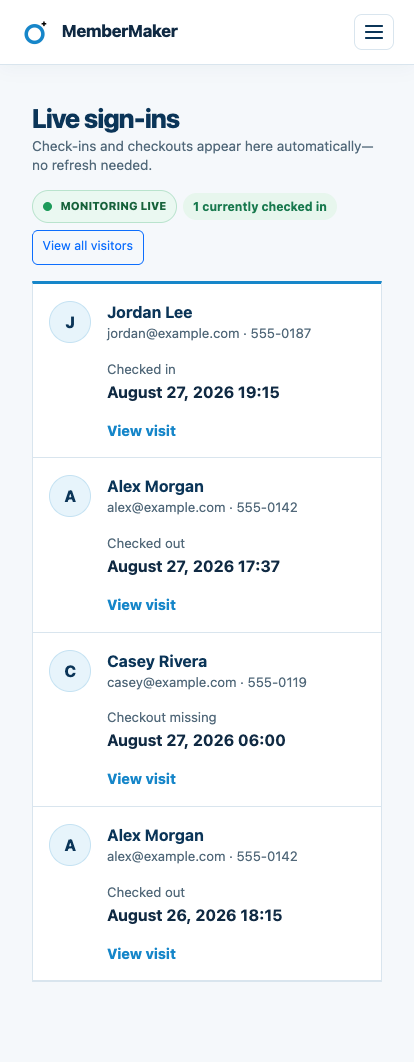
The middle ground
Growing and mid-sized organizations often need a consistent visitor record across several teams or locations, but not every SME reception area needs an enterprise security system.
Reception desks, programs, and events create separate visitor lists that are difficult to read, combine, and review consistently.
Reusable prompt groups and shared kiosk settings help teams ask the right questions without rebuilding each visitor flow from scratch.
If your real need is operational visitor attendance—not access control or compliance—a focused system can be faster to introduce and easier to own.
Your web dashboard and kiosk app
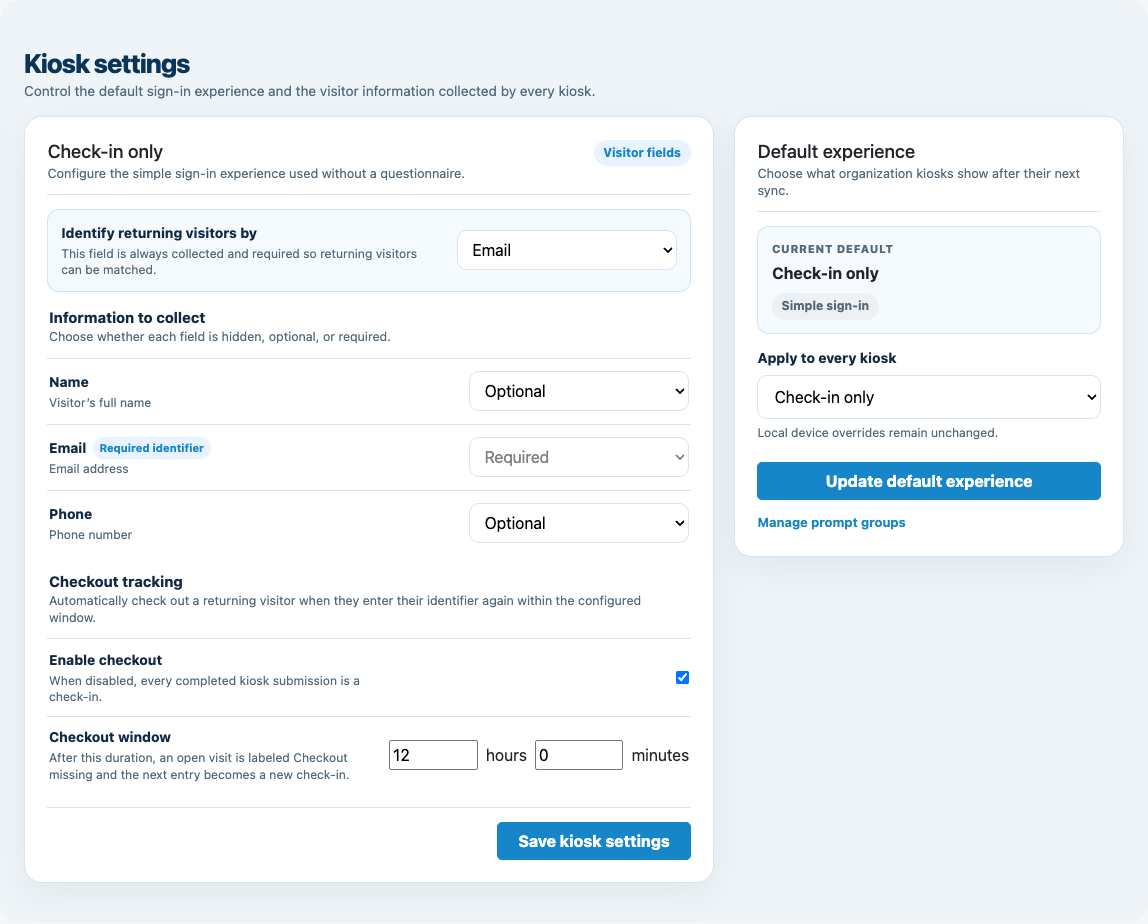
Create your organization, build and publish kiosk questions, choose required fields, and configure identification and optional checkout. Apply a published question group to your organization’s kiosks from the dashboard.
Create a web accountInstall MemberMaker on your iPad or Android tablet, sign in to the same account, and select your organization. Open fullscreen mode so visitors can check in at your table or entrance.


Keep the dashboard open to see arrivals and departures update automatically. Review visitor history, answers, and checkout status, then export records when you need them.

Customizable visitor sign-in kiosk
Create reusable prompt groups for different entrances, events, programs, or visitor types. Add custom questions, choose required fields and answer types, then apply the published form to this device or every kiosk in the organization.



Keep a front-desk form, event questionnaire, volunteer flow, or check-in-only experience ready to use.
Mix text, Yes or No, single choice, multiple choice, number, and date questions in the same group.
Change only the device in your hand or apply one published experience throughout the organization.
Published forms download to the device so visitor sign-in can continue without a connection.
A repeatable rollout
Use familiar phones and tablets at the visitor-facing edge while administrators manage settings and records from the web dashboard.
Where it fits
MemberMaker is strongest where SMEs need consistent attendance records and flexible forms without security infrastructure.
Run a consistent visitor station at non-secure reception areas while keeping each office’s records separated.
Give programs and service locations their own visitor flow while administrators move between their organizations.
Collect attendee details, repeat visits, optional departures, and duration for internal programs and hosted gatherings.
Standardize sign-in across chapters, facilities, classes, and recurring programs without issuing specialized hardware.
An honest fit check
A mid-sized organization can still have a simple visitor workflow—or security requirements that demand a dedicated enterprise platform.
Common questions
SME means small or medium-sized enterprise. This page focuses on growing and mid-sized organizations that need consistent visitor attendance records without deploying a workplace security platform.
MemberMaker can fit a growing or mid-sized organization when the requirement is straightforward visitor contact and attendance tracking. Fit depends more on workflow complexity and security requirements than employee count alone.
Yes. A user can belong to multiple organizations and switch between the organizations they have been added to. Each organization keeps its own visitors, settings, devices, and records.
Yes. New check-ins and checkouts appear in the live dashboard without manual page refreshes, and administrators can open visitor history for status, timestamps, and duration.
Yes. Checkout is optional and disabled by default. When enabled, a returning visitor can enter the same configured identifier within the checkout window to close an open visit without repeating the full form.
Published kiosk forms and pending submissions can be stored on the device for later synchronization. Dashboard administration and publishing changes still require a connection.
No. MemberMaker does not verify identities, print badges, screen watchlists, unlock doors, notify employee hosts, or provide safety-critical emergency mustering. Organizations needing those controls should choose a dedicated enterprise visitor-security platform.
Start in your browser
Create a web account to manage your organization. When you’re ready for guests, install the kiosk app on your iPad or Android tablet.
Set up your questions and kiosk settings in the web dashboard. See live sign-ins here once your kiosk is running.
Create a web accountReady to set up your kiosk? Download the app and sign in to the same account.